

No-shows cost your healthcare practice time and revenue. Learn timing, strategies, and templates proven to work and backed by Australian research.
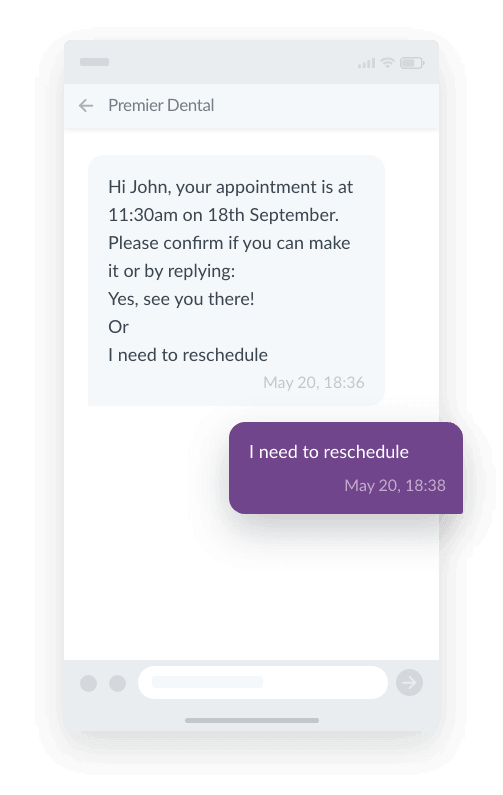
SMS appointment reminders are automated text messages sent to patients before a booking. They confirm the clinic, date and time for patients and also provides a fast way to confirm, cancel or reschedule appointments. Because texts are read almost instantly and don’t depend on a patient being free to take a call, they directly target the three biggest causes of no-shows: forgetting, confusion over appointment details, and not knowing how to reschedule. For Australian clinics, this is why SMS consistently outperforms phone calls and letters at keeping patients in their seats.
Globally, research indicates that non-attendance rates in healthcare average between 6% and 12%, carrying a massive financial and operational burden on clinics. A recent Australian study estimated the cost of non-attendance to be as high as $114,800 annually for a single physiotherapy clinic. Beyond the financial impact, missed appointments also cause the following flow-on effects:
- Increased waiting times for other patients
- The patient doesn’t receive the care they need due to missing the appointment
- It wastes the valuable time and resources of healthcare providers
The Reasons behind No-Shows
In order to understand why appointment reminders work so well, it’s important to understand the root cause of no-shows. Research from Stat Health Australia, The Australian Nursing and Midwifery Federation and The National Library of Medicine, confirm that non-attendance is most commonly due to:
- Forgetting the appointment
- Getting confused about the appointment details (eg. date, time, location)
- Unable or not knowing how to reschedule
Reminder systems are a proven, evidence-based method to counteract all of these common issues and significantly improve clinic attendance.
SMS Appointment Reminder Best Practices
Many studies confirm that any form of reminder system will likely improve attendance. However, to get the most out of reminders, it’s important to be strategic about three things:
- Channel: How the reminders are sent
- Timing: When the reminders are sent
- Content: What information to include in your reminders
Best channel for appointment reminders: SMS
The standard recommended channels for appointment reminders are SMS and phone calls. While both are proven to improve attendance, SMS is widely considered the optimal option based on three main factors: visibility, cost effectiveness and patient experience.
| Visibility | Cost | Patient preference | Patient experience | |
| SMS | High 98% open rate | Low Due to automation | 97% (NLB) | High Can be read and actioned at the patient’s convenience. |
| Phone call | Low 30-60% contact rate | High Due to staff labour requirement | 94% (NLB) | Medium Reliant on the patient being free to pick up the call and if not, listening to the voicemail and/or calling back within clinic hours. |
Visibility and Trust
While SMS has an open rate of 98%, phone calls only have a 30-60% contact rate. There are a few key reasons behind this:
- Phone call reminders strictly rely on staff working hours. Because most patients also work during these hours, calls frequently go unanswered. On the other hand, texts are received instantly and read or answered at a convenient time for the recipient.
- People are increasingly wary of scam calls. According to Telstra, 42% of Australians are less likely to pick up calls due to this concern. For SMS, the new SMS Sender ID Register, directly addresses SMS scam concerns by making legitimate business texts more easily identifiable.
Cost and Scalability
The most obvious benefit to using SMS appointment reminders is the ability to automate reminders. With automated SMS reminders, every patient receives reminders at specified times, every time, without any manual intervention. This means staff will not experience any changes in workload with fluctuating appointment bookings and cancellations, and have more time to focus on more important tasks.
The financial and operational savings of this automation are substantial. In a trial conducted by Western Health, transitioning from mailed appointment letters to SMS resulted in an estimated 62% cost saving and massively reduced the administrative burden on staff.
Patient Experience and Preference
A 2024 study published in the National Library of Medicine assessing consumer preferences for healthcare appointment reminders in Australia found a significant preference for appointment reminders sent via SMS.
This is further supported by data from the Victorian Department of Health which reported that patients are far more likely to read an SMS than to answer a phone call or check a voicemail.
Ultimately, patients are looking for convenience more than anything else. The ease of receiving and actioning a reminder at a time that suits them, via a device they already carry with them at all times, is simply unmatched. By aligning your clinic’s communication methods with these modern preferences, you completely remove the friction of phone tag and unreturned voicemails, creating a much smoother and more accessible experience for your patients.
Best time to send SMS appointment reminders: 24-48hrs beforehand
Timing is everything. Sending a reminder too early means the patient might forget again, while sending it too late doesn’t give them enough time to rearrange their schedule or allow your clinic to fill the slot.
A review conducted by the Monash Health Centre for Clinical Effectiveness found that in the vast majority (75%) of the studies they reviewed, clinics opted to send an SMS 48 hours prior to the appointment.
Data from HotDoc, a leading Australian healthcare platform, supports this timeframe as highly effective. For most clinics, 24-48 hours is the sweet spot with the highest response rates. However, where an appointment has been booked far in advance, it’s recommended to send an early reminder (e.g., 7 days out) followed by a final confirmation request 24 to 48 hours prior.
Best SMS templates for appointment reminders
Key Information to Include
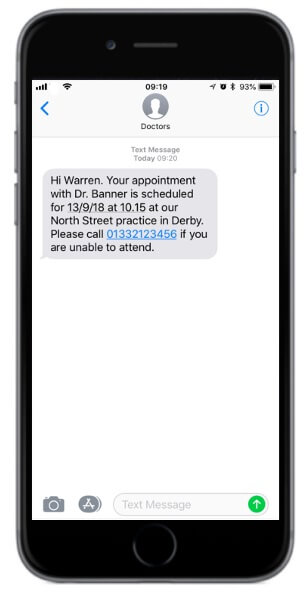
As a starting point, all appointment reminders should include the following key information:
- The patient’s first name: This immediately grabs their attention and personalises the interaction.
- Appointment details: Clearly state the clinic name, date, and time so patients have all the facts at a glance.
- Instructions to cancel or reschedule: Make it as easy as possible for patients to cancel or change their booking via a link, phone number* or replying directly to the message.
*Note that this study highlights the difficulties patients face when asked to call a number to reschedule or cancel including the phone line being engaged or disconnected and long wait times which often resulted in the patient not following through. Due to this we recommend one of 3 options:
- Provide a link
- Implement a chatbot to handle reschedules/cancellations via an automated flow
- Implement two-way messaging via a VMN so a member of staff can organise and respond to reschedules/cancellations
Extra Top Tips
Beyond the basics, you can optimise your reminders by applying a few simple principles based on behavioural science research and guidelines from the Victorian Department of Health’s Communication Toolkit for Health Services:
- Tap into reciprocity: By mentioning that a specialist has set aside time just for the patient, it creates a subtle obligation to attend.
- Leverage the “Messenger Effect”: Make an automated SMS feel more human by signing off with a real staff member’s first name.
- Gain a commitment: Ask the patient to actively confirm that they will bring a specific, necessary item like their Medicare card.
- Use secure links for complex info: If your clinic needs to provide detailed instructions, include a secure link to the required document in your SMS.
Ready-to-Use Templates
Here are four templates you can easily copy, paste, and adapt for your clinic based on the information and top tips covered above.
1. For a standard, best practice reminder
Hi [First Name], this is a reminder for your appointment at [Clinic Name] on [Date] at [Time]. Reply Y to confirm or N to cancel or reschedule.
2. For reducing no-shows
Hi [First Name],
Our specialist has made time in their diary for your appointment on [Date] at [Time]. Reply Y to confirm or click [Link] to cancel or reschedule.
[Staff First Name]
[Clinic Name]
3. For reminding a patient to bring something
Hi [First Name], your upcoming appointment at [Clinic Name] is on [Date] at [Time]. Reply Y to confirm you will bring your [Item]. Click [Link] to cancel or reschedule.
4. For sending a document
Hi [First Name], your upcoming appointment at [Clinic Name] is on [Date] at [Time]. View [Document Type] here: [Link]. Password is your postcode. Reply Y to confirm or N to cancel or reschedule.
Appointment Reminder Communication Sequences
Good
- SMS Reminder 48hrs before the appointment
Better
- SMS Reminder 48hrs before the appointment
- If no response, follow-up phone call 24hrs before the appointment
Best
- SMS Reminder 7 days before the appointment for appointments made more than a month in advance or for appointments with complex instructions/prep required
- SMS Reminder 48hrs before the appointment
- If no response, follow-up phone call 24hrs before the appointment
Considerations for choosing an SMS appointment reminder provider
To set up automated SMS reminders you will need to first choose an SMS Provider who will then help you with the technical setup based on your clinic size and needs and existing systems. The key things to research and consider when choosing an SMS provider are:
- Direct connections to local Australian networks (e.g., Telstra, Optus): Guarantees high delivery rates so your messages reliably reach patients.
- Guaranteed uptime: This is a promise made by a service provider to keep their systems accessible for a specific percentage of time. The higher the percentage, the more reliable.
- Security and compliance: Ensure the provider can comply strictly with the Australian Privacy Principles (APPs) and holds ISO 27001 certification (the global standard for information security) to keep patient data secure. Other international standards such as GDPR compliance also indicate that the provider takes compliance seriously.
- Ability to integrate with your PMS/EMR: Allows for easier setup and means your SMS appointment reminders can be fully automated using triggers from your existing systems, eliminating manual data entry for your team.
- Local Australian-based support: Provides fast, timezone-aligned technical assistance to resolve any configuration or delivery issues without delay.
Considering Esendex to send your appointment reminders? See a summary of our service below based on the SMS provider considerations for healthcare:
| Healthcare SMS Provider Considerations | Esendex |
| Direct Network Connections | ✔️ |
| Guaranteed Uptime | 99.99% |
| ISO 27001 Certified | ✔️ |
| Australian Privacy Principles | ✔️ |
| Integrations | ✔️ e.g. TrakCare , Epic |
| Australian-based Support | ✔️ |
FAQs
![]() What should an SMS appointment reminder say?
What should an SMS appointment reminder say?
 What should an SMS appointment reminder say?
At minimum, include the patient’s first name, the clinic name, appointment date and time, and a clear way to confirm, cancel or reschedule — either a reply option (Y/N), a link, or both. Keep it under 160 characters where possible so it sends as a single SMS.
![]() How far in advance should you send an appointment reminder?
How far in advance should you send an appointment reminder?
24–48 hours before the appointment is the sweet spot for most clinics, giving patients enough notice to rearrange their schedule while the appointment is still fresh in mind. For bookings made more than a month out, send an earlier reminder around 7 days prior, followed by a confirmation request 24–48 hours beforehand.
![]() Is it rude to text a patient an appointment reminder?
Is it rude to text a patient an appointment reminder?
No — Australian research shows patients actively prefer SMS to phone calls for appointment reminders, since it lets them read and act at a time that suits them rather than being caught off guard by a call. SMS reminders are now considered standard practice across Australian healthcare.
![]() Do SMS reminders actually reduce no-shows?
Do SMS reminders actually reduce no-shows?
Yes. Reminder systems address the most common causes of non-attendance — forgetting, confusion about appointment details, and not knowing how to reschedule — and studies consistently show clinics using automated SMS reminders see meaningfully fewer missed appointments than those relying on calls or letters alone.
![]() Can patients reschedule or cancel directly from a text?
Can patients reschedule or cancel directly from a text?
Yes. Depending on your setup, patients can reply directly to the SMS, click a link to manage their own booking, or use two-way messaging so a staff member can respond — removing the need to call the clinic during business hours.

Esendex
The team at Esendex comprises tech experts and experienced marketers who thrive on sharing their know-how, to support prospects and customers to identify the right mobile messaging solutions for their business.